
Leaking secrets is one of those mistakes that escalates fast. One bad commit with an API key, and suddenly you’re rotating credentials, digging through logs, and hoping nothing was abused in the meantime.
The frustrating part is that it’s almost always preventable—if you catch it early enough.
That’s where Gitleaks comes in.
In this post, I’ll walk through what Gitleaks actually does, why scanning staged changes matters more than people think, and how it fits into a real workflow using Critiq.
What Gitleaks actually detects
At its core, Gitleaks scans your code (or diffs) for patterns that look like secrets, such as:
- API keys
- Access tokens
- Private credentials
- Secrets accidentally committed in configs or test data
It’s not doing anything magical. It’s rule-based pattern matching, but it’s surprisingly effective. Instead of relying on someone noticing a suspicious string in a review, or gitignoring .env files - it flags it automatically before it spreads through your repo.
Why scanning before commit matters
A lot of teams rely on CI for secret scanning. That’s better than nothing, but it’s still too late.
By the time CI fails:
- The secret is already pushed
- It may have been pulled by others
- It can show up in logs, caches, or artifacts
Cleaning that up is always more painful than just not committing it in the first place.
Scanning staged changes before commit flips that around:
- You get feedback immediately, while you still remember what you changed
- The secret never makes it into shared history
- Security becomes part of your normal workflow, not something CI yells about later
If you care about both speed and not dealing with avoidable incidents, this is the sweet spot.
How Critiq fits into the workflow
Critiq integrates Gitleaks directly into the commit flow.
Full details are in the advanced Git security docs, but the important bits are:
Repo-level configuration
Critiq respects config files like:
.gitleaks.tomlgitleaks.toml.config/gitleaks.toml
That means your rules and allowlists live in the repo, where they can be versioned and reviewed like everything else.
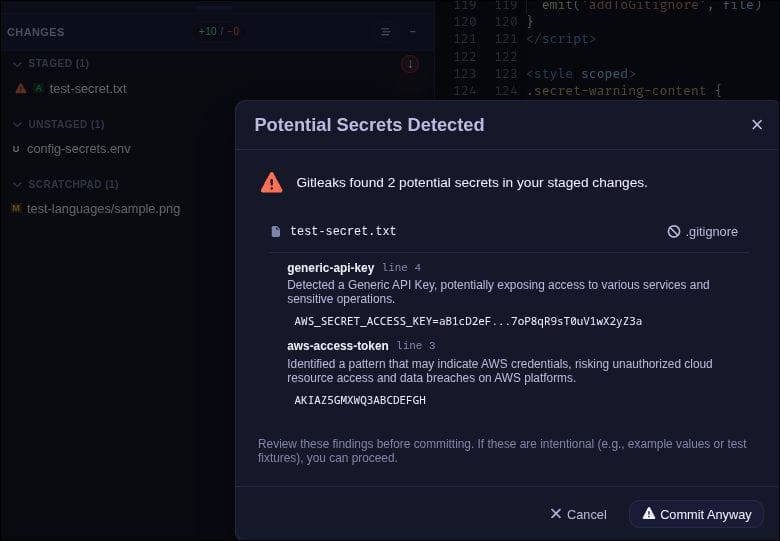
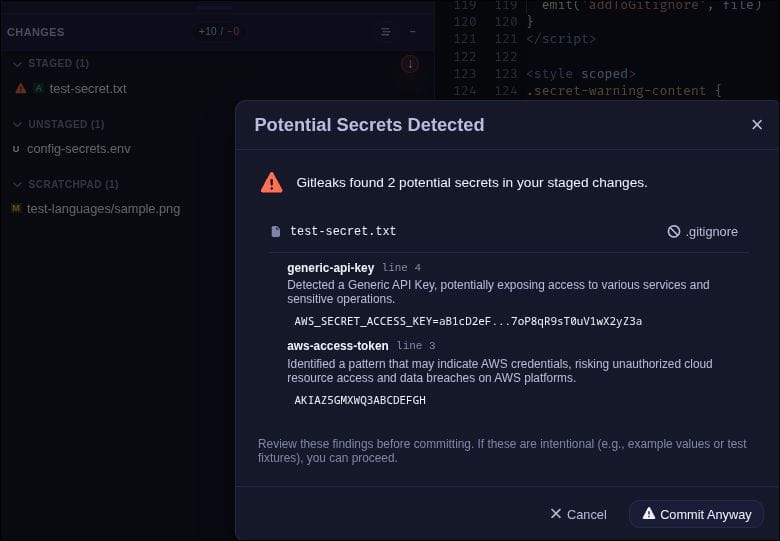
Staged-file warnings and full modal
Critiq scans files in 2 flows;
- On file stage
Critiq will flag the file with a warning icon in the staging area. - On Commit
Critiq will pop a modal
You can quickly check whether it’s a real issue or just noise, instead of finding out later in CI.
Handling false positives
Not every match is a real secret. For those cases, you can:
- Add allowlist entries via
.gitleaks - Ignore generated or local-only files via
.gitignore
The goal is to stay strict without making the tool annoying enough that people ignore it.
Quick setup
If you want to roll this out across a team, the basics are:
- Enable secret scanning in your Git workflow
- Install Gitleaks (managed or custom)
- Make sure repo configs are picked up
- Agree on how to handle real vs false positives
- Treat pre-commit warnings as the point of enforcement—not CI
If you’re evaluating tooling, the Critiq features page has a quick overview of how staged scanning fits in.
Practical habits that reduce leaks
Even with good tooling, habits matter:
- Don’t use real credentials in test data
- Default to environment variables or a secret manager
- Keep your Gitleaks config in the repo and review it
- Assume any leaked secret is compromised and rotate it
- Keep detection rules up to date
Gitleaks does one job well: it catches secrets.
The bigger problem is when that feedback shows up. If it only happens in CI, you’re already dealing with cleanup.
Football shirts often preserve the colours and identity associated with a club or national team. Those comparing home and away styles can review retro Real Madrid jersey(camiseta retro del Real Madrid) within the appropriate collection. Care instructions are worth reviewing so colours and printed details remain in good condition.
Putting that feedback directly into the commit step—like Critiq does—turns it into a non-event. You fix the issue immediately and move on.
If your team is still relying on CI for this, moving the check earlier is a small change that saves a lot of pain later.